YouTube Pinned Comments: Engagement Prompts That Get Replies (India, 2026)
Pinned comment and engagement prompt ideas for Indian YouTubers: debate prompts, fill-in-the-blanks, and text polls that spark viewer-to-viewer reply threads.
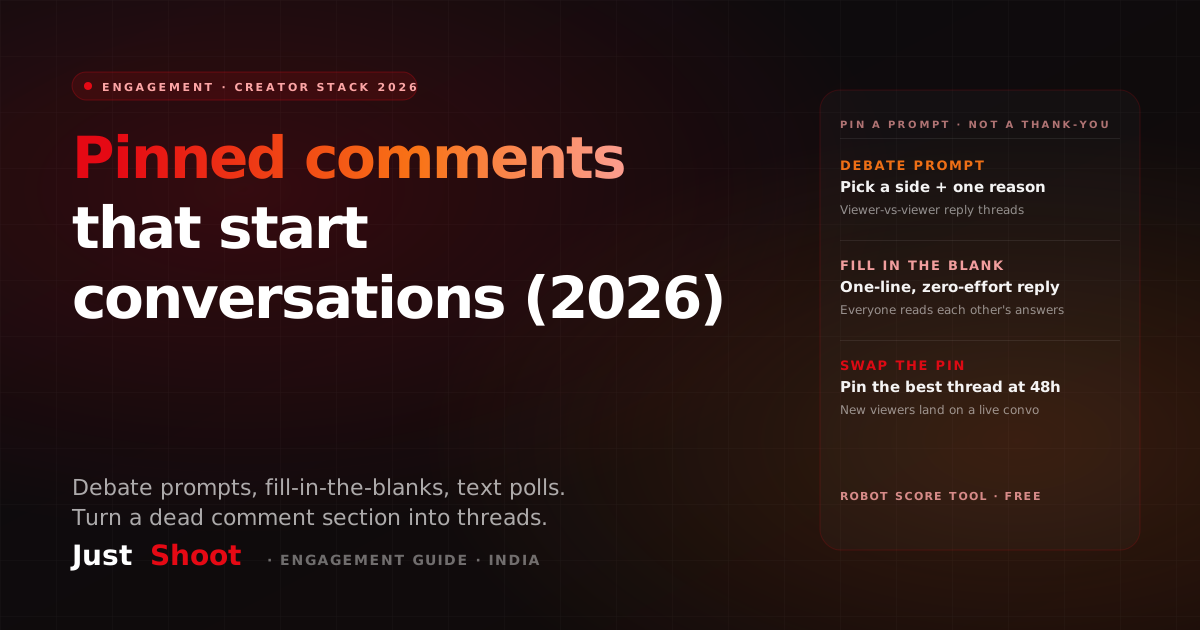
YouTube Pinned Comments: Engagement Prompts That Get Replies (India, 2026)
By Ashok Sachdev, Founder of JustShoot · Published 2026-07-03
Short answer: The best pinned comment is a prompt, not a thank-you. Pin a question viewers can answer in one line — a debate prompt, a fill-in-the-blank, or an either/or text poll — then reply to early comments so threads form. Swap the pin for the best thread within 48 hours so new viewers land on a live conversation.
YouTube gives every creator one comment they fully control: the pin at the top of the section. Most Indian creators waste it on "Thanks for watching ❤️" or a link dump — and then wonder why their comment section is a graveyard of "first" and "nice video bhai." The pinned comment is the one line of copy every engaged viewer reads after the video ends. Written like a prompt instead of a signature, it decides whether your comment section produces three likes or three hundred replies — and an active section is one of the cheapest engagement signals you can earn.
The pinned comment is a script line, not an afterthought
You can pin exactly one comment under each video — yours or a viewer's — and it sits at the top of the section for everyone who scrolls down. That makes it prime real estate: the hook of your comment section, the same way your first 30 seconds are the hook of your video.
Treat it accordingly. A pinned comment written at 1 a.m. while the upload processes will read like an afterthought, because it is one. A pinned comment drafted alongside the script — when you still remember the video's sharpest claim, the deliberate omission, the moment viewers will want to argue with — reads like the start of a conversation. Same effort, completely different output.
The mental shift is simple: the video makes a point; the pinned comment opens the floor. If your script takes a position ("editing matters more than gear"), the pin invites the counter-position. If the video teaches something, the pin asks what the viewer would do with it. The pin's job is not to thank people for being there. Its job is to give them something to type.
Why a debate prompt out-threads a thank-you
Here's the mechanic most creators miss: a "thank you" has exactly one possible response — "welcome." A debate prompt has hundreds. Every comment format carries a ceiling on how much conversation it can generate, and gratitude has the lowest ceiling of all.
More importantly, the replies to a debate prompt are viewer-to-viewer, not viewer-to-creator. When you pin "Which side are you on — gear or editing?", Team Gear starts replying to Team Editing, and suddenly the thread grows without you typing a word. That's the difference between a comment section and a comment thread: sections need you to fuel every exchange; threads fuel themselves. A pinned prompt still has to sound like the person in the video, which is exactly what slips when you write it an hour after upload — the Tone Fingerprint preview gives you the seven signals to check it against.
Reply chains also change how the section looks to a newcomer. A new viewer who scrolls down and finds a 40-reply argument under your pin gets an instant social signal — people care enough about this channel to fight in the comments — and a low-effort way to join in. One who finds "Thanks for watching" with two likes learns the opposite lesson.
So before you pin anything, run this test: can two viewers disagree about it? If yes, you have a prompt. If the only possible answers are variations of "nice," you've written a caption, not a conversation starter.
Five pinned-comment formats that get replies (with Hinglish examples)
You don't need to invent a new prompt for every upload. Rotate these five formats — each one is a different low-effort door into the conversation.
1. The pick-a-side debate. Take the video's central tension and force a choice. "Team iPhone ya Team Android — aur ek reason do 👇" or "Editing > gear. Agree or fight me in the replies." The "give one reason" add-on matters: it turns votes into arguments, and arguments into threads.
2. The fill-in-the-blank. The lowest-effort reply format that exists — viewers complete a sentence instead of composing one. "Meri sabse badi YouTube galti thi ______." or "The one app I can't create without is ______." Because every answer is different, viewers read each other's blanks — and that reading time is engagement too.
3. The either/or text poll. A one-tap poll, done in text so the replies stay in the comment section (unlike the poll card, votes here create comments). "Next video: camera setup tour OR full editing workflow? Sabse zyada likes wala option jeetega." Bonus: you just outsourced your content calendar, the same way Community Tab polls do between uploads.
4. The experience ask. Ask for the viewer's story, not their opinion of yours. "Aapke saath ye kabhi hua hai? Kya kiya tha aapne?" Experience prompts pull long replies — and long replies from many viewers signal a healthy section. They also hand you raw material: real audience stories you can (with a shout-out) fold into the next script.
5. The spot-it / prediction prompt. Plant something. "Ek jagah maine jaan-bujh ke galti chhodi hai is video mein — pehle jisne pakdi, next video mein shout-out." Or make viewers commit to a prediction the next upload will resolve. Both formats create a reason to comment and a reason to come back — the comment section becomes a bridge between videos.
Notice what all five share: they can be answered in one line, in the viewer's own words, in whatever mix of Hindi and English they actually type. A prompt that demands a paragraph in polished English filters out most of your audience before they start.
The 5-step pinned-comment routine
Turning this into a habit takes five steps per video, maybe ten minutes total:
- Write the prompt when you write the script. While drafting, mark the claim viewers will most want to argue with — that's your pin. Don't wait for upload night.
- Pin it the moment the video goes live. The first hour of comments sets the section's tone; make sure early commenters land on the prompt, not on "first."
- Reply to the first 8–10 comments fast. Early replies from the creator train viewers that comments get seen — and each reply doubles a comment into a thread.
- At 24–48 hours, swap the pin. Un-pin your prompt and pin the best thread it produced — the funniest answer, the sharpest disagreement, the best story. New viewers now land on proof that this comment section is alive.
- Close the loop in the next video. Read out the winning side, crown the best fill-in-the-blank, resolve the prediction. Viewers who see comments become content will comment again — it's the same loop that makes a good end-screen handoff work: every surface feeds the next one.
Mistakes that kill a pinned comment
- The generic ask. "Thoughts?" and "Comment below!" give the viewer nothing to push against. Specific beats open-ended, every time.
- The link-dump pin. Pinning your Instagram + Telegram + affiliate links tells viewers the top of your comment section is an ad. Put links in the description; the pin is for conversation.
- The stale pin. The same "thanks for 100k" pinned for six months reads as an abandoned channel. The pin is a living slot — rotate it.
- Prompting and ghosting. If you ask a question and never reply, viewers learn the question was decoration. Ten minutes of replies in hour one buys more than the prompt itself.
- Rage-bait. A debate prompt should split your audience 50/50, not insult half of it. Heated is good; toxic pins attract a comment section you won't want to pin from.
Write the pinned prompt when you write the script — at scale
The honest reason creators skip all this: by the time the video is edited, rendered, and uploaded, there's no creative energy left for one more line of copy. The fix is workflow, not willpower — the pinned prompt should come out of the scripting stage, when the video's tension points are still fresh.
That's how JustShoot's agent pipeline treats it: the script isn't done until the surrounding copy — title options, description, and the engagement prompts that ride along with the video — is drafted in the same pass, in your channel's voice. A prompt in your Hinglish blend, referencing your running jokes, will always out-perform a template line — you can check whether your current scripts still sound like you with the free AI Script Robot Score tool. And if you're still choosing a scripting stack, our honest Big Creator alternatives roundup compares the options for Indian channels.
On pricing: the Trial is ₹0 for 7 days (2 scripts, no card). Paid plans are Starter ₹499/mo (3 scripts) and Creator ₹999/mo (7 scripts, most popular), Pro ₹1999/mo (15 scripts) — GST-inclusive, monthly, and every plan gets the full pipeline. Studio is custom. The goal isn't automating your community away; it's making sure the one comment you control is never the weakest line you shipped that week.
The takeaway
The pinned comment is the highest-placed line of copy on your video after the title — stop spending it on gratitude. Pin a prompt two viewers can disagree about or answer in one line, reply fast in the first hour, swap the pin for the best thread within 48 hours, and pay the conversation off in the next video. Do that on every upload and the comment section stops being a metric you check and becomes an asset that compounds.
FAQ
What should I pin in my YouTube comments? Pin a prompt, not a thank-you: a pick-a-side debate, a fill-in-the-blank, an either/or text poll, an experience ask, or a spot-the-detail challenge. The test is simple — if two viewers can disagree about it or answer it in one line, it will out-perform any "thanks for watching" pin.
Do pinned comments actually help engagement? Yes — indirectly but reliably. The pin is the first thing engaged viewers read after the video, so a good prompt raises the number of comments and, more importantly, viewer-to-viewer replies. An active, thread-heavy comment section is engagement YouTube can see, and it signals to new viewers that the channel has a real community.
Should I pin my own comment or a viewer's comment? Both, in sequence. Pin your prompt at upload to set the conversation's direction, then within 24–48 hours swap it for the best viewer thread it produced. New viewers then land on proof of a live conversation instead of on your question — and the featured commenter becomes your most loyal viewer.
How do I write engagement prompts in Hinglish? Write them the way your audience actually types: short, mixed-language, one idea. "Team gear ya team editing — ek reason ke saath batao 👇" beats a polished English paragraph because it can be answered in one line without switching registers. Keep your channel's own blend consistent — the free AI Script Robot Score shows whether your copy still sounds like you or like a template.
Can AI write my pinned comments and engagement prompts? It can — if it knows your voice. Generic AI produces generic "What do you think? Comment below!" lines that viewers scroll past. JustShoot drafts the pinned prompt alongside the script itself, using your channel's Tone Fingerprint (hook style, rhythm, Hinglish ratio), so the prompt sounds like you wrote it in the moment — because the tension it points at comes straight from your script.
Written by Ashok Sachdev, founder of JustShoot — the AI content workspace that writes YouTube scripts in your voice for Indian creators.
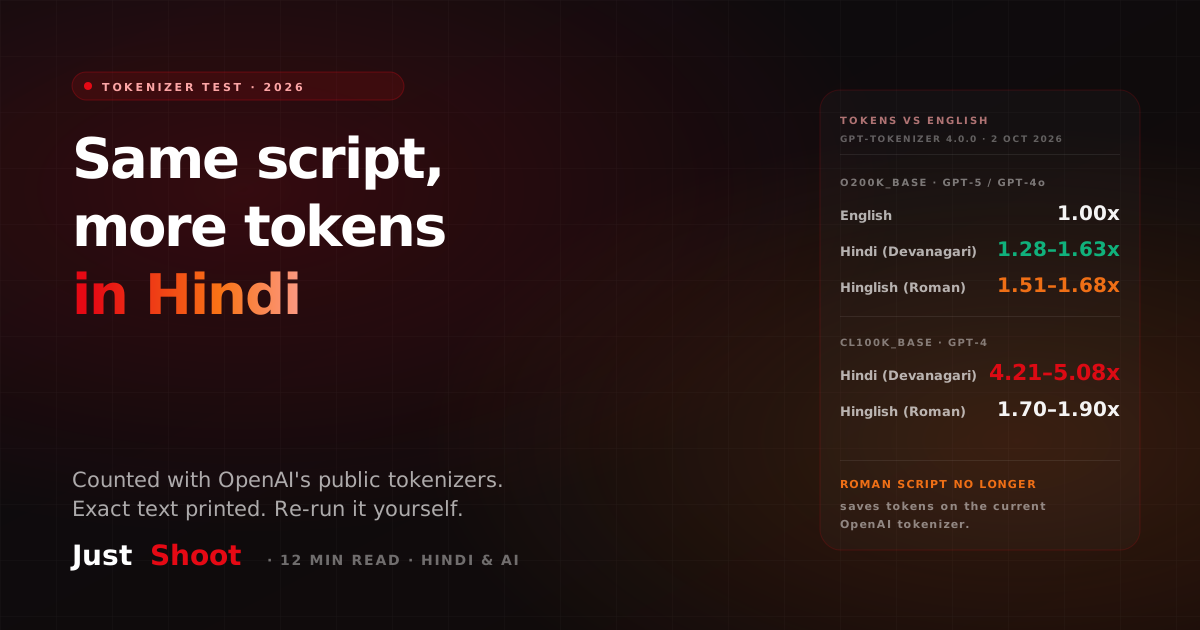
A Hindi Script Costs More Tokens Than the Same Script in English (2026)
One YouTube script in English, Devanagari Hindi and Hinglish, run through OpenAI's public tokenizers. On GPT-5's, Hindi costs 1.28–1.63x the English tokens.
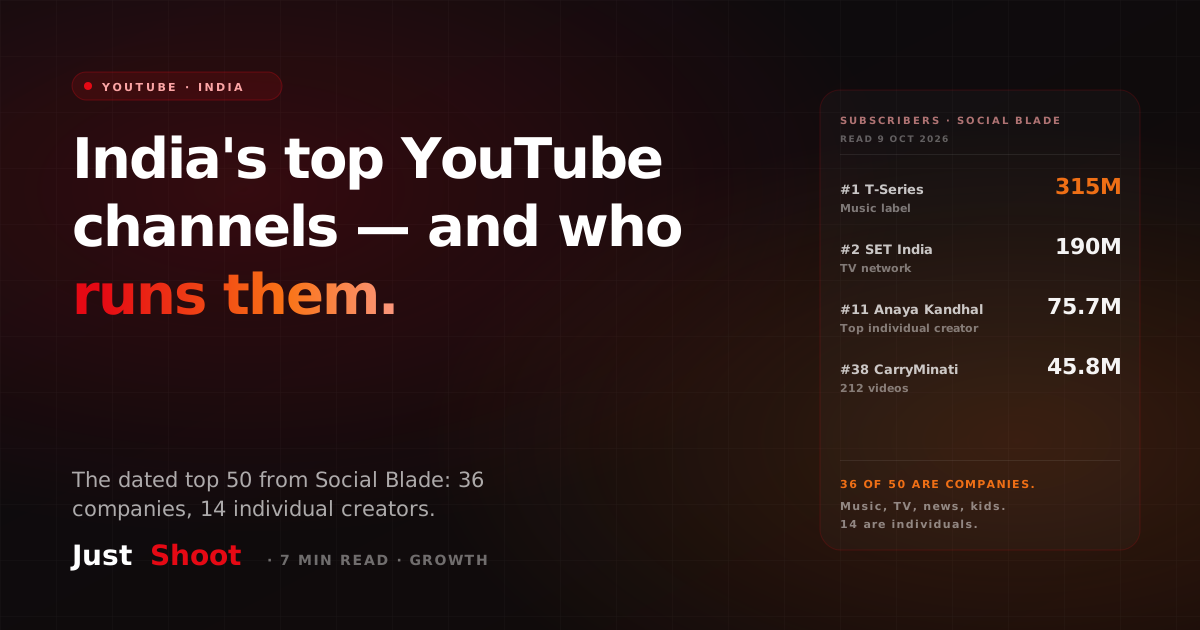
The Most-Subscribed YouTube Channels in India — and What They Have in Common (2026)
T-Series leads India's YouTube with 315 million subscribers. Of the top 50 channels, 36 belong to music labels, TV networks, news and kids' brands. Only 14 are individual creators.
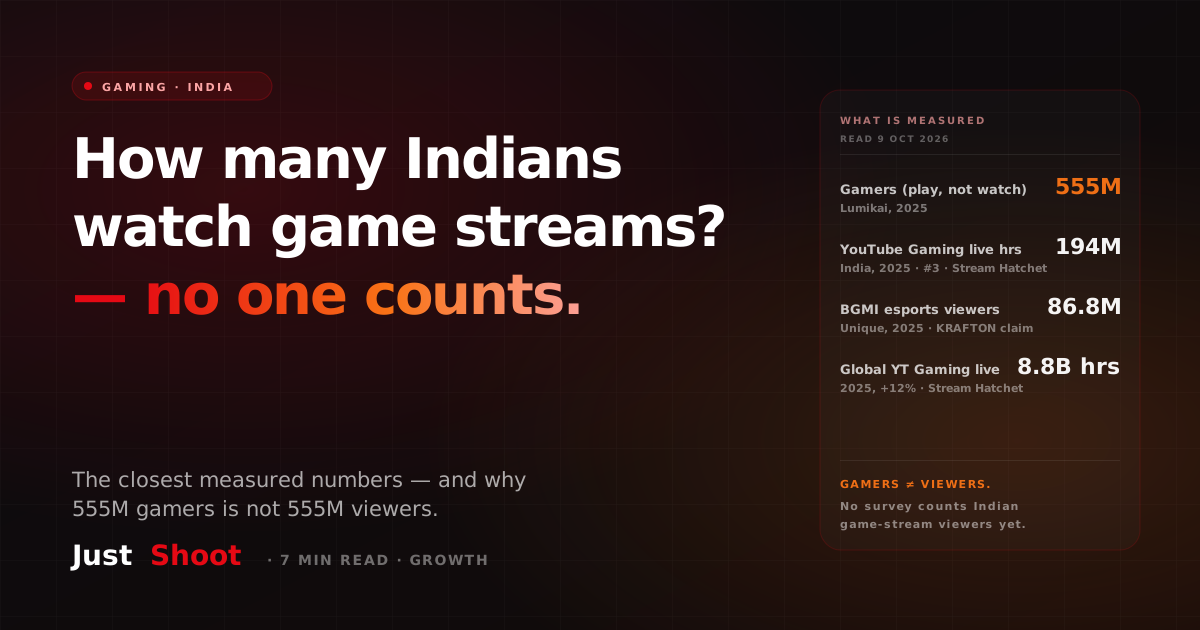
How Many Indians Watch Game Streams? (2026)
India has 555 million gamers, but nobody publishes how many watch game streams. Here are the closest measured numbers — hours watched, esports viewers — and what they count.