YouTube Community Tab: Posts & Polls That Get Engagement (India, 2026)
Write YouTube Community Tab posts and polls that get engagement between uploads: why image posts beat text, poll questions that earn votes, and posting cadence.
YouTube Community Tab: Posts & Polls That Get Engagement (India, 2026)
By Ashok Sachdev, Founder of JustShoot · Published 2026-07-01
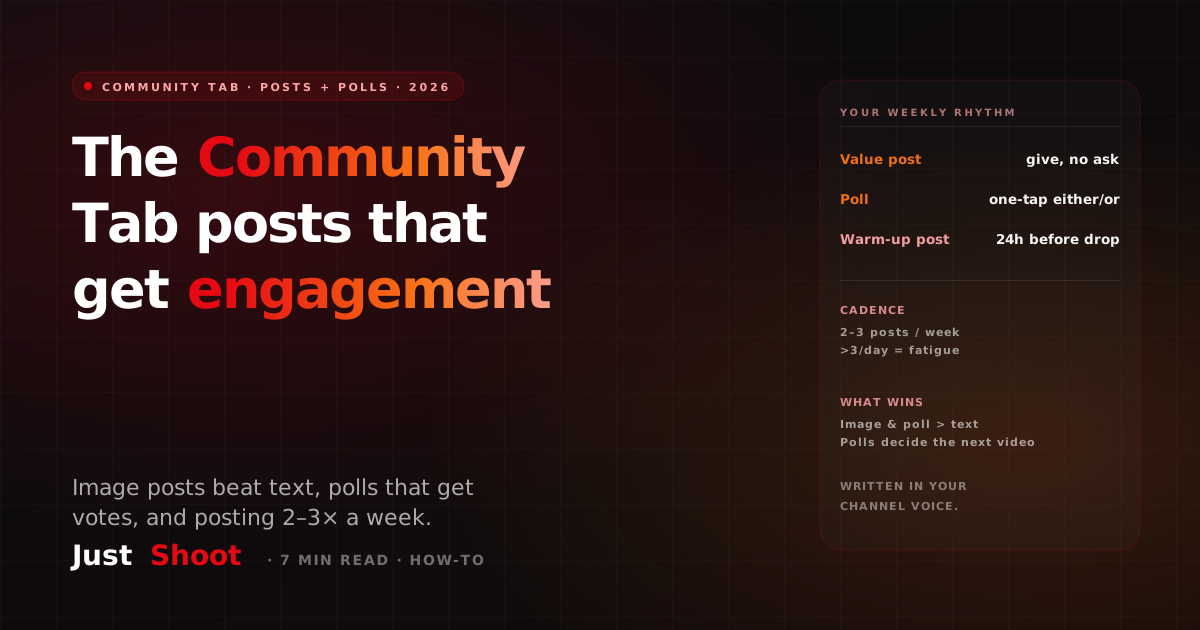
Short answer: The YouTube Community Tab is a script surface most creators waste. Post 2–3 times a week between uploads, favour image and poll posts over plain text (they surface more in the feed), write polls as a one-tap either/or, and drop a post 24 hours before a video to warm your audience for it.
Everyone obsesses over the video script and forgets that YouTube gives you a second place to write to your audience every single day. The Community Tab — posts, images, and polls that show up in the subscriber feed and on your channel page — is the surface most Indian creators either ignore or fill with "New video out now 🔥" spam. Treated as a copywriting job instead, it keeps your channel warm between uploads, trains the algorithm that people engage with you, and turns passive subscribers into a crowd that actually shows up on drop day.
What is the Community Tab, and why treat it as a script?
The Community Tab is the feed of text posts, images, GIFs, and polls that appears under your channel and inside subscribers' home and subscriptions feeds. It's available to every channel now, not just large ones. Unlike a video, a Community post costs you thirty seconds and no editing — which is exactly why it's undervalued. It is a direct line to the people who already opted in.
The mistake is treating it as an announcement board. A post that says "Video is live, go watch" gives a viewer no reason to tap, react, or reply — so the feed shows it to fewer people, and the next one to fewer still. A post written the way you'd write a hook does the opposite: it earns a reaction, the feed reads that as engagement, and your reach compounds. The same instinct that makes a good first 30 seconds of a video script — curiosity, a clear stake, one idea — makes a good Community post.
Image posts beat text posts — write for the visual
If you take one rule from this page: stop posting plain text. In practice, image and poll posts consistently pull more engagement than text-only updates. The feed gives them more visual weight, they stop the scroll, and they're far easier to react to on a phone — which is where nearly all of your Indian audience is reading. Community copy still has to sound like the channel, and that is the first thing to drift when you are writing fast — the Tone Fingerprint preview gives you the seven signals to write against.
You don't need a designer. An image post can be:
- A still frame or thumbnail from your next video with a one-line teaser ("Guess how much this setup cost me 👇").
- A behind-the-scenes photo — your desk, your shoot, a screenshot of a comment you're replying to.
- A text-on-image quote — the single sharpest line from your upcoming script, set on a plain background. This is the highest-leverage move: it pulls a great sentence out of your script and gives it a second life.
Write the caption like ad copy, not a diary entry. One idea, a reason to react, and a question or prompt at the end. In Hinglish that might read: "Ye ek galti maine 2 saal tak ki — aur kisi ne bataya nahi. Aapne bhi ki hai? Comment karo 👇" Short, specific, and it asks for something.
How to write a Community poll that gets votes
Polls are the cheapest engagement you will ever earn, because voting is one tap. But most polls die because they ask a boring or lopsided question. Three rules make a poll that gets votes:
- Make it a genuine either/or. "Do you like my videos?" is dead on arrival. "Next video: iPhone 16 review OR budget phone under ₹15k?" gives a real, close choice — and the votes tell you what to make next.
- Tie it to what you'll actually do. When a poll decides your next topic, thumbnail, or series direction, viewers vote because their vote matters. Announce the result in the next post ("You picked budget phones — shooting it this week"). That loop trains people to keep voting.
- Keep options to two or three, phrased in the viewer's words. Long or jargon-heavy options lose the one-tap advantage. Write them the way your audience talks.
Polls double as free audience research. A week of "which topic next?" polls is a content calendar the audience built for you — and it pairs neatly with picking the best time to upload for an Indian audience so the post lands when they're actually online.
Posting cadence: how often without burning out your feed
More is not better. The sweet spot for most Indian creators is 2–3 Community posts per week. That's frequent enough to stay in the feed and keep the channel warm between uploads, without training subscribers to mute or scroll past you.
Post more than one a day and two things happen: your reactions-per-post fall (the same audience spread across more posts), and heavy posting can read as noise, so the feed shows each one to fewer people. Quality and spacing beat volume. A simple weekly rhythm that works:
- One value post — a tip, a hot take, a text-on-image quote. Pure give, no ask to watch anything.
- One poll — audience research or a next-video decision.
- One warm-up post — tied to your upcoming upload (see below).
That's three posts, none of them "go watch my video," and together they keep engagement flowing all week. The same thinking applies after the upload too: a pinned comment with a real engagement prompt picks up where the Community post left off and keeps the reply threads going under the video itself.
Use a post to warm the algorithm before a drop
Here's the tactic serious creators use: post to the Community Tab about 24 hours before a video goes live. Tease the topic without giving it away — a poll ("Guessing game: how many subs did I gain last month?"), a still from the video, or a question the video answers.
Why it works: the engagement on that pre-drop post signals to YouTube that your audience is active and interested right now, and it primes the exact people most likely to click when the video publishes. You're not begging for views — you're building a small wave of activity that the upload rides. Combine it with a script built to hold the viewers it brings in, and you protect your audience retention from the first second. This is the same reason your video description and tags matter — every surface around the video is a chance to signal relevance, as covered in our guide to writing YouTube descriptions and tags.
Write Community copy in your channel voice — at scale
The reason most creators skip the Community Tab is time. Writing 2–3 sharp posts a week, on top of scripting and editing, is real work — and generic "engage your audience!" posts do more harm than good. This is where writing in your voice matters: a Community post that sounds like a template is worse than no post.
That's exactly what JustShoot's tone system is built for. It learns your channel's voice — your slang, your rhythm, your English/Hindi/Hinglish mix — from your existing videos, then writes hooks, scripts, and short-form copy that sound like you, not like a bot. You can see it work in seconds with the free Tone Fingerprint tool: paste a sample of your writing and it plays back the patterns that make your voice yours.
On pricing: the Trial is ₹0 for 7 days (2 scripts, no card). Paid plans are Starter ₹499/mo (3 scripts) and Creator ₹999/mo (7 scripts, most popular), Pro ₹1999/mo (15 scripts) — GST-inclusive, monthly, every plan gets the full pipeline. Studio is custom. The point isn't to automate the human out of your channel; it's to make the fifth post of the week as sharp as the first, in a voice viewers already recognise.
The takeaway
The Community Tab is a free, daily channel to your most engaged audience — and it rewards writing, not announcements. Favour image and poll posts over text, write polls as a one-tap either/or that decides something real, post 2–3 times a week, and use a pre-drop post to warm the algorithm before every upload. Do that consistently and the tab stops being an afterthought and starts being the thing that keeps your channel alive between videos.
FAQ
How often should I post on the YouTube Community Tab? Two to three times a week is the sweet spot for most Indian creators. It keeps you in the subscriber feed and warms the channel between uploads without fatiguing your audience. Posting more than once a day tends to lower engagement per post and can train subscribers to scroll past you.
Do image posts really get more engagement than text posts? Yes — in practice, image and poll posts consistently outperform plain text updates. They carry more visual weight in the feed, stop the scroll, and are easier to react to on a phone, which is where almost all of your audience reads. If you only change one thing, stop posting text-only updates.
What makes a Community poll get votes? A genuine, close either/or that viewers can answer in one tap, options phrased in their own words, and a poll that decides something real — your next topic, thumbnail, or series. Announce the result afterwards so people learn their vote matters, which keeps them voting on the next one.
Can I use the Community Tab to promote a new video? Yes, but indirectly. Instead of "New video out now," post about 24 hours before the drop with a teaser, still, or poll tied to the topic. The engagement signals to YouTube that your audience is active and primes the right viewers to click when the video publishes.
How do I write Community posts in my own voice without spending hours? Pull your sharpest lines from scripts you've already written, keep each post to one idea with a reason to react, and use a voice-aware tool. JustShoot learns your channel's tone from your existing videos and drafts posts, hooks, and scripts that sound like you — try the free Tone Fingerprint tool to see your voice patterns first.
Written by Ashok Sachdev, founder of JustShoot — the AI content workspace that writes YouTube scripts in your voice for Indian creators.
A Hindi Script Costs More Tokens Than the Same Script in English (2026)
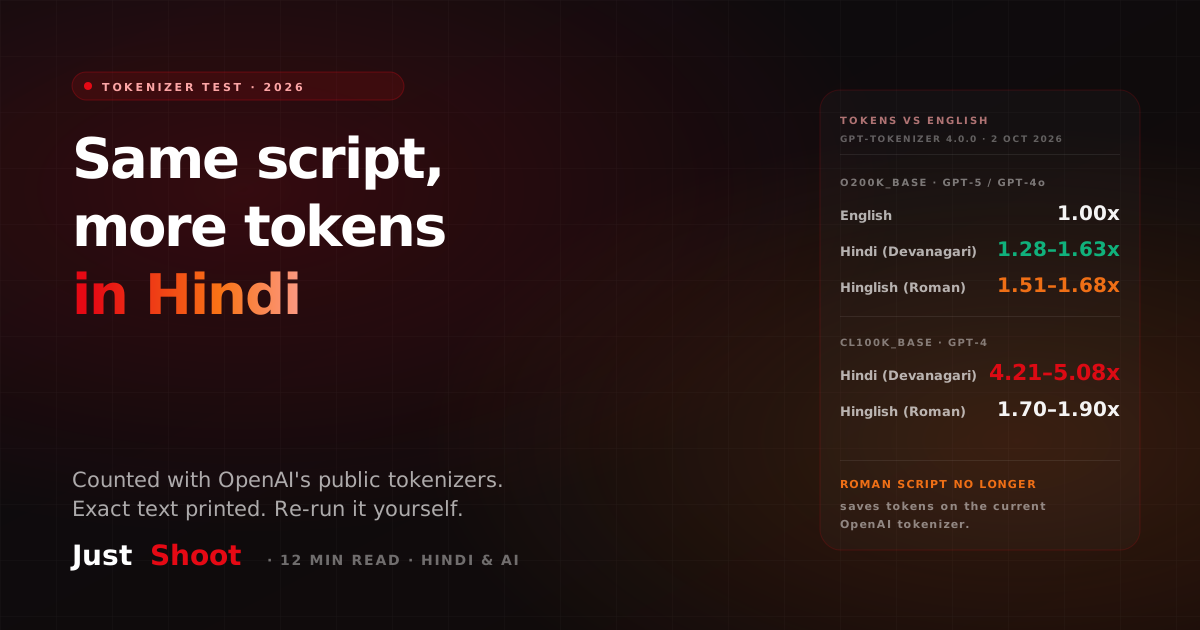
One YouTube script in English, Devanagari Hindi and Hinglish, run through OpenAI's public tokenizers. On GPT-5's, Hindi costs 1.28–1.63x the English tokens.
The Most-Subscribed YouTube Channels in India — and What They Have in Common (2026)
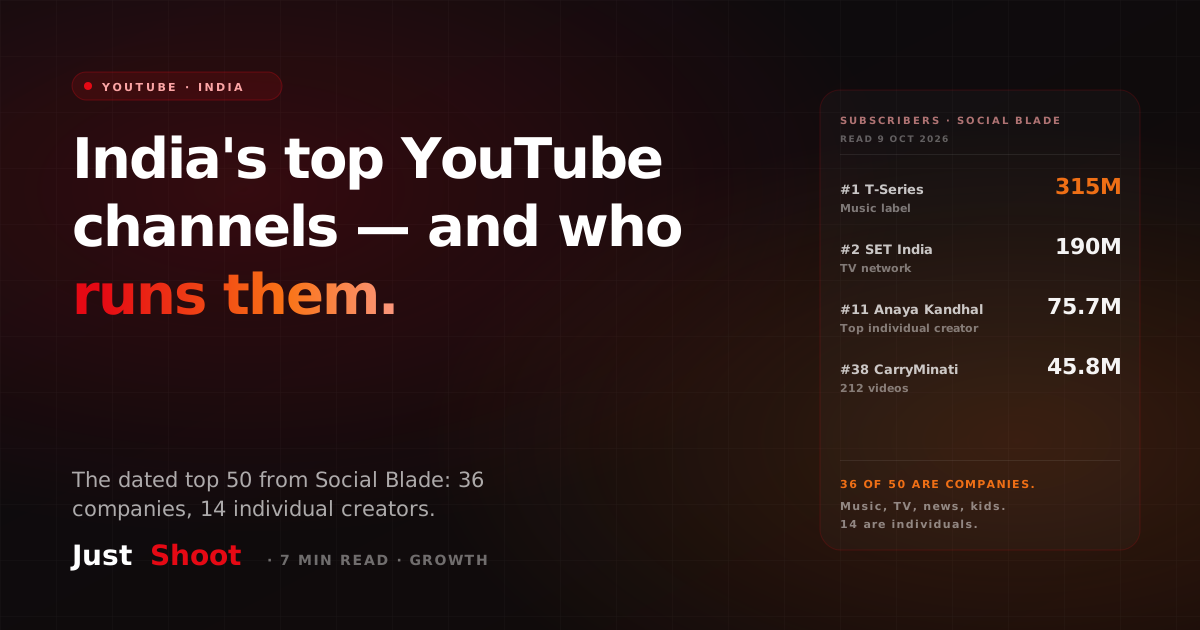
T-Series leads India's YouTube with 315 million subscribers. Of the top 50 channels, 36 belong to music labels, TV networks, news and kids' brands. Only 14 are individual creators.
How Many Indians Watch Game Streams? (2026)
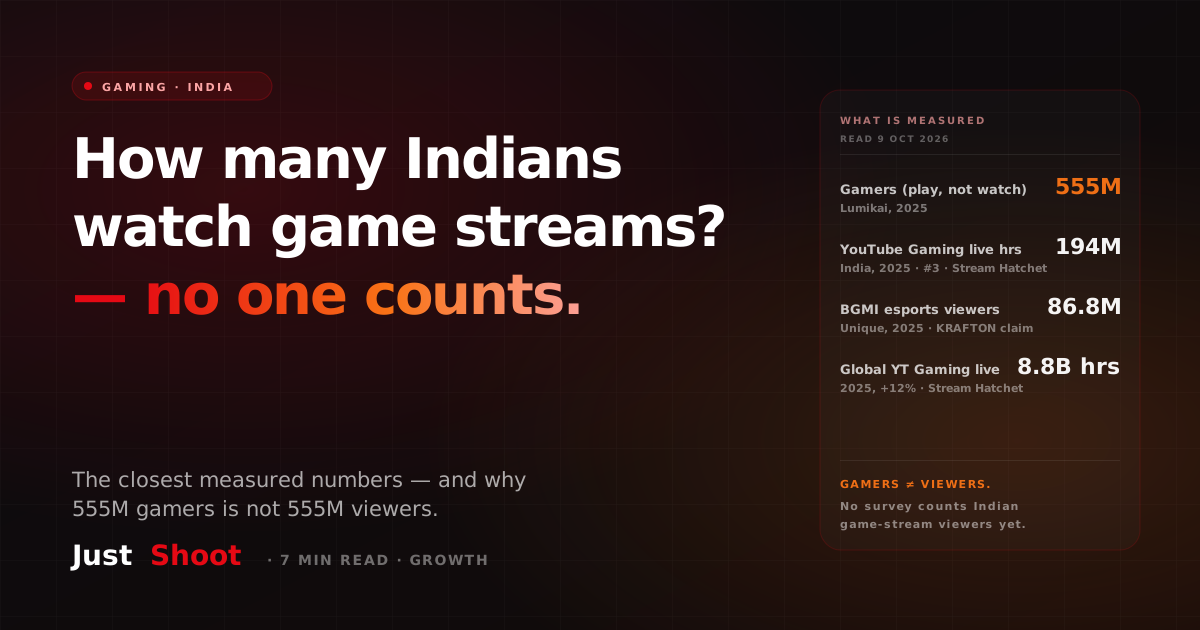
India has 555 million gamers, but nobody publishes how many watch game streams. Here are the closest measured numbers — hours watched, esports viewers — and what they count.