How to Start a YouTube Channel in India (2026): Step-by-Step for Beginners
A no-fluff 2026 guide to starting a YouTube channel in India — pick a niche, set up the channel, shoot with just a phone, script your first video, and get your first 100 subscribers.
How to Start a YouTube Channel in India (2026): Step-by-Step for Beginners
By Ashok Sachdev, Founder of JustShoot · Published 1 August 2026
Short answer: To start a YouTube channel in India in 2026 you need five things and none of them is expensive gear: a specific niche, a Google account to create the channel, a phone that shoots 1080p, a script for your first video, and the discipline to publish consistently. Skip the ₹50,000 camera. The creators who grow are the ones who pick a clear niche, write a real hook, and upload every week — not the ones with the best equipment. Here's the exact order to do it in.
Most "start a channel" advice in India is either a gear ad or vague motivation. This is the practical version — what to actually do this week, in sequence, to go from zero to a live channel with a real first video.
Step 1 — Pick a specific niche (this decides everything)
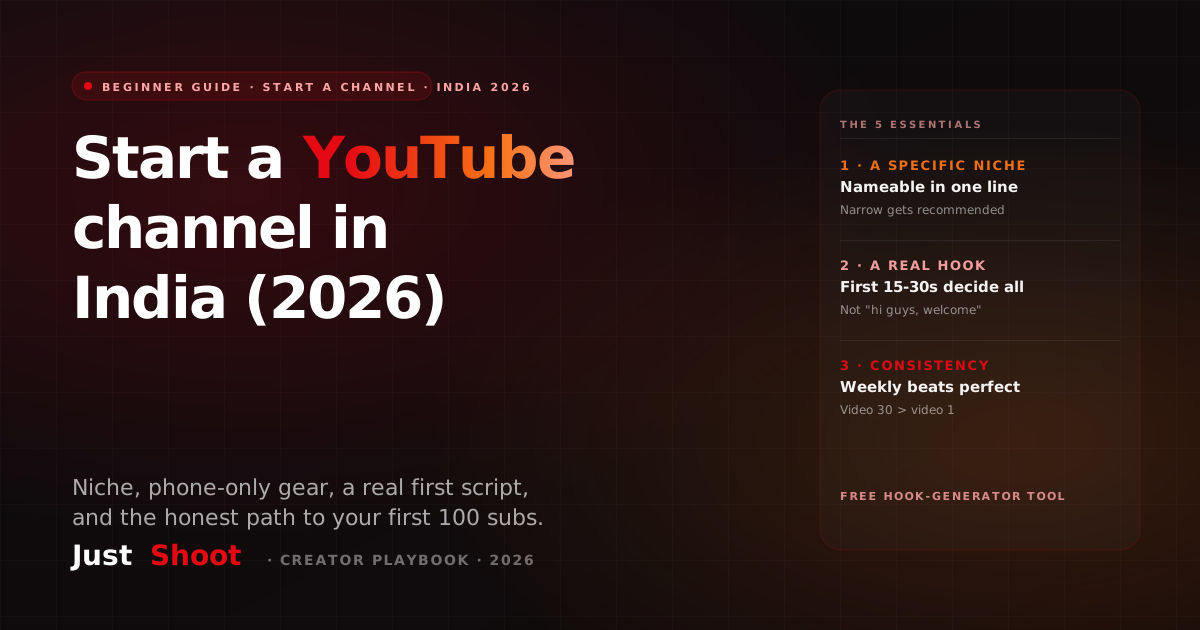
The single biggest beginner mistake is a "random" channel — vlogs one week, tech the next. YouTube's algorithm recommends channels it can categorise, and a scattered channel confuses it. Pick a niche narrow enough that a stranger can describe your channel in one line: not "gaming" but "BGMI tips for mobile players", not "finance" but "SIP basics for first-time investors in Hindi". Narrow gets recommended; broad gets ignored. Need ideas grounded in what's working in India? Start from a list of proven YouTube video ideas for India.
Step 2 — Create the channel (10 minutes)
Sign in to YouTube with a Google account → click your profile → Create a channel → choose a Brand Account (not your personal name — a brand account lets you add managers later and rename freely). Add a clear channel name, a clean logo, a banner that states what you do and how often you post ("Weekly BGMI tips • Every Sunday"), and a channel description with your niche keywords in the first line.
Step 3 — Gear: your phone is enough (really)
In 2026, a mid-range phone shooting 1080p, natural window light, and a ₹500 collar mic is a completely publishable setup. Audio matters more than video — viewers forgive a soft image, never bad sound. Don't spend on a camera until you've published 20 videos and know you'll stick with it. The bottleneck for beginners is never gear; it's ideas and consistency.
Step 4 — Script your first video (where most channels win or lose)
You don't need to memorise a word-for-word script, but you do need a spine: a hook, 3-4 points, and a call to action. The first 15-30 seconds decide everything — if you open with "hi guys, welcome to my channel", you've lost half the viewers. Open with the promise or the payoff instead. This is the first-30-seconds hook that every retention-led video needs. If writing the script is the part that stalls you, that's exactly the problem JustShoot solves — it drafts the script in your own voice so you can focus on shooting. You can also pressure-test opener ideas free with the hook generator.
Step 5 — Thumbnail and title (your click-through rate lives here)
A video with a weak thumbnail dies no matter how good it is — the thumbnail and title are the actual product on the homepage. Make the thumbnail readable on a small phone screen: one clear subject, big legible text (3-4 words max), high contrast. Write a title that promises a specific outcome, front-loads the keyword, and stays under ~60 characters so it doesn't get cut off. Test both before you upload.
Step 6 — Basic SEO so the video is findable
YouTube is the world's second-biggest search engine. Put your main keyword in the title, the first line of the description, and naturally through a 150-200 word description. Add 5-10 relevant tags. This won't make a brand-new video go viral, but it's how your videos get found months later through search — the compounding traffic that grows a small channel.
Step 7 — Upload, then do it again next week
Publish, share it once where your audience already is, and move on to the next video. Beginners obsess over one upload; growth comes from volume plus consistency. Pick a realistic cadence you can hold for six months — one video a week beats five in week one and none after. Consistency is the single strongest signal you send the algorithm and your subscribers.
The honest timeline (so you don't quit at video 7)
Almost no one blows up on their first few videos. Most Indian channels that "made it" have 20-50 mediocre videos before one takes off — those early uploads are how you learn hooks, pacing, and your own voice. Judge your first 3 months on whether you published consistently and improved, not on views. The creators who quit at video 7 are the ones who never find out what video 30 could have done.
Common beginner mistakes to avoid
- A random, un-nameable niche — the fastest way to get zero recommendations.
- Weak openers — "hi guys, aaj hum baat karenge" bleeds viewers in the first 10 seconds.
- Buying gear before content — a ₹50k camera on a boring script is still a boring video.
- Inconsistent uploads — three videos then a two-month gap resets your momentum.
- Chasing views instead of reps — the first 20 videos are practice; treat them that way.
Where JustShoot fits
The hardest, most-skipped part of starting a channel is writing — the script, the hook, the title, the description, the shorts. JustShoot is an AI content OS built for Indian creators that runs nine agents (research → in-voice script → fact-check → storyboard → thumbnail prompts → SEO → shorts → distribution) so a beginner can ship a publish-ready package without a team. It writes in your voice across Indian languages, so your channel sounds like you from video one.
JustShoot starts at Trial ₹0 (7 days, 2 scripts, no card), then Starter ₹499/mo (3 scripts), Creator ₹999/mo (7 scripts, most popular), Pro ₹1999/mo (15 scripts), and Studio is custom. Every plan runs the full pipeline; scripts don't roll over.
New channel, first script? Run your draft through the Robot Score tool to check it sounds human, not like generic AI.
FAQ
How much does it cost to start a YouTube channel in India? Creating the channel is free. You can start with a phone you already own, natural light, and a ₹500 mic — so the real cost can be ₹0. Don't buy a camera until you've published ~20 videos and know you'll continue; gear is never the beginner bottleneck.
Do I need an expensive camera to start? No. A mid-range phone shooting 1080p with good audio and lighting is completely publishable in 2026. Viewers forgive a soft image but not bad sound, so a cheap collar mic matters more than a camera.
How many videos before a YouTube channel grows? Most channels that grow have 20-50 videos before one takes off. Treat your first few months as practice — the goal is consistent publishing and improving your hooks and voice, not instant views.
How often should a beginner upload? Pick a cadence you can hold for six months — one solid video a week is better than a burst followed by a long gap. Consistency is the strongest signal to both the algorithm and your subscribers.
Do I need to script my videos as a beginner? You don't need a word-for-word script, but you do need a spine — a strong hook, a few clear points, and a call to action. The opening 15-30 seconds decide your retention, so scripting at least the hook is worth it. Tools like JustShoot draft the whole spine in your voice so you can focus on shooting.
Ashok Sachdev is the founder of JustShoot, an AI content OS that writes YouTube scripts in your own voice for Indian creators. Connect on LinkedIn.
How to Check If Your YouTube Script Sounds AI-Generated (2026)
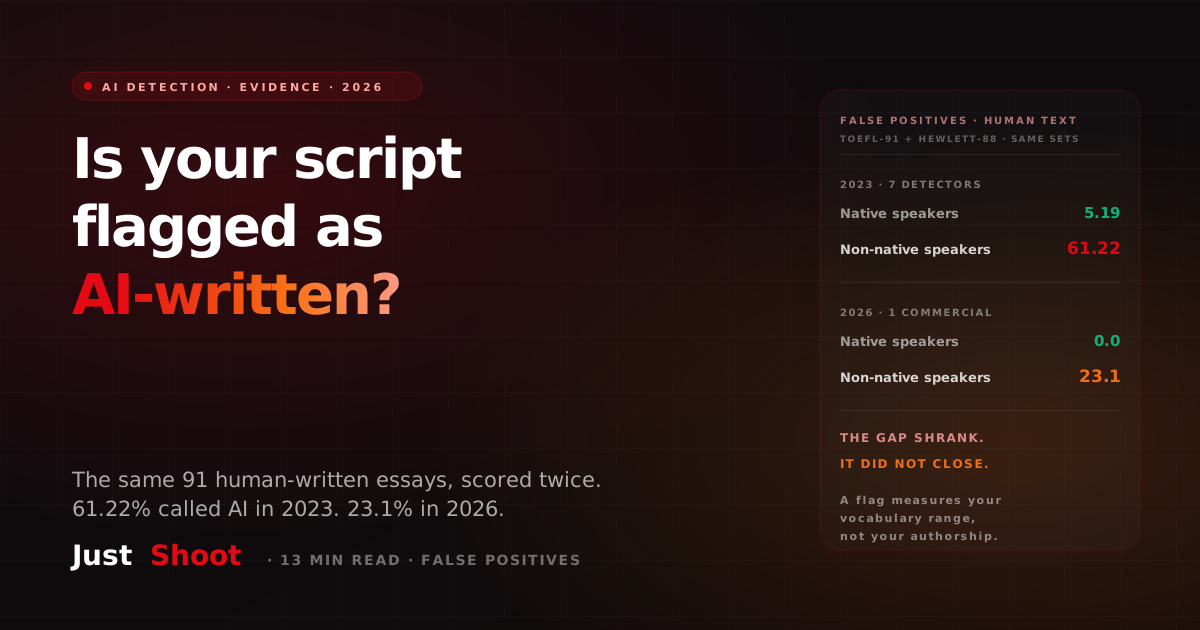
The same 91 human-written essays were scored by AI detectors twice: 61.22% were flagged as AI in 2023, 23.1% in 2026. Native-speaker essays scored 5.19% and 0.0%.
How Accurate Are YouTube's Auto-Captions in Hindi? (2026)
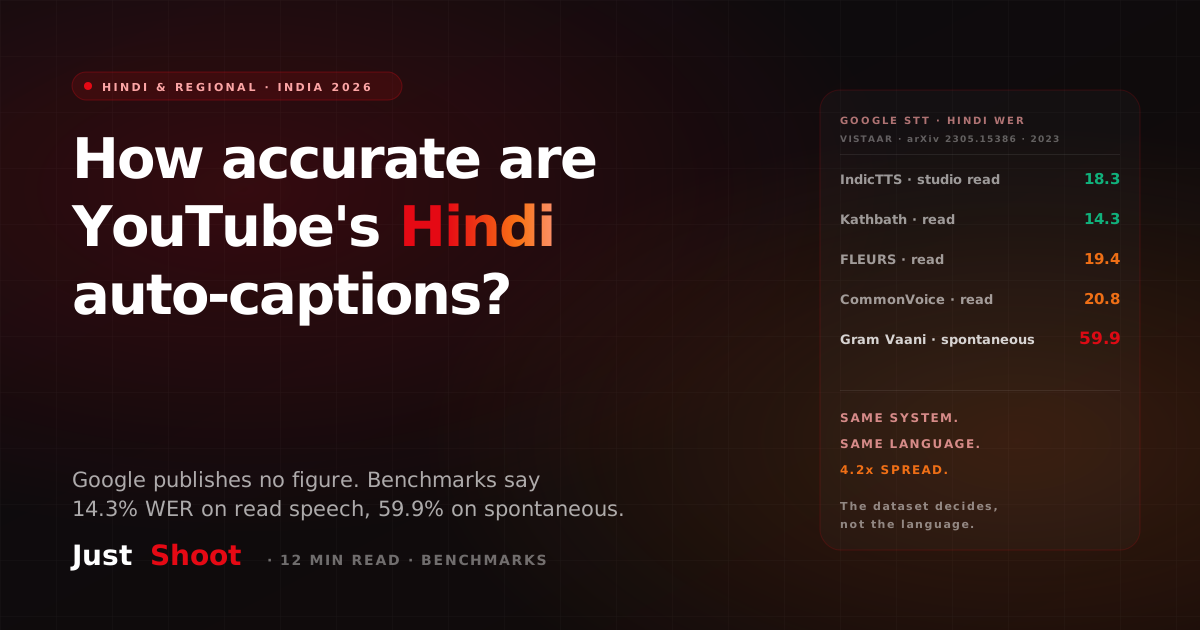
Google publishes no Hindi accuracy figure for YouTube captions. The nearest dated benchmarks put Hindi ASR between 14% and 60% word error rate, depending entirely on the dataset.
Best AI Malayalam YouTube Script Generator (2026)
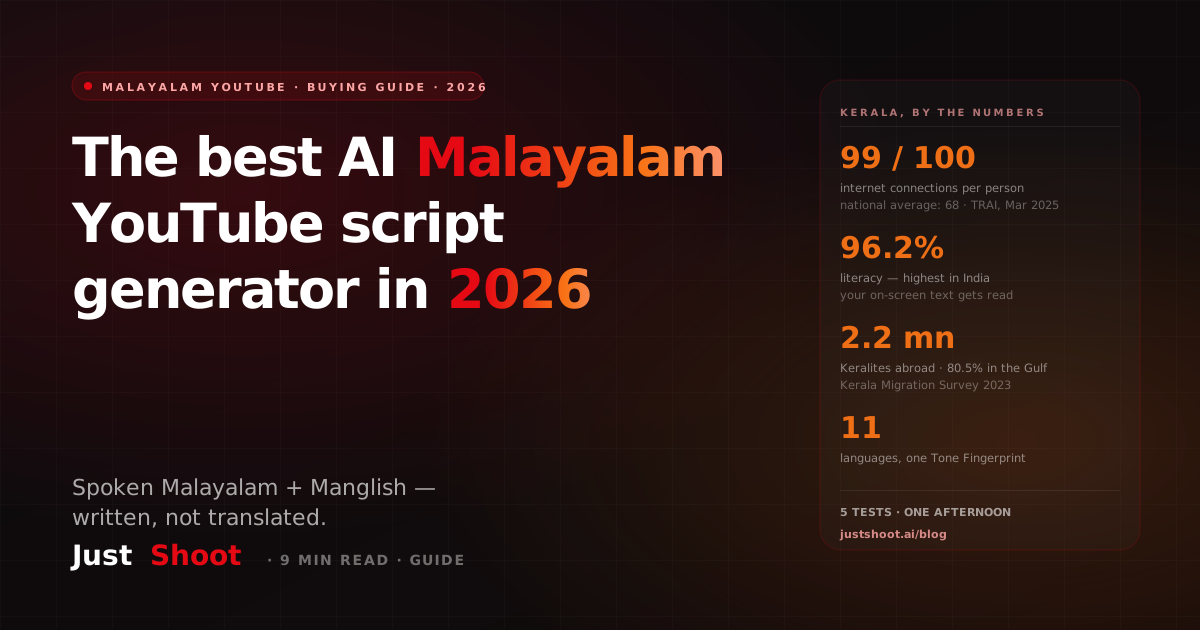
Which AI writes Malayalam YouTube scripts natively — spoken register, Manglish code-mix, dialect held steady? A buying guide for Kerala creators, with Kerala's real connectivity numbers and five tests to run before you pay.