10 Copy-Paste AI Prompts for YouTube Scripts (India, 2026)
A free copy-paste AI prompt library for YouTube scripts — 10 prompts by job (hook, outline, CTA, title, shorts, repurpose, fact-check, voice-match) plus where prompts stop scaling.
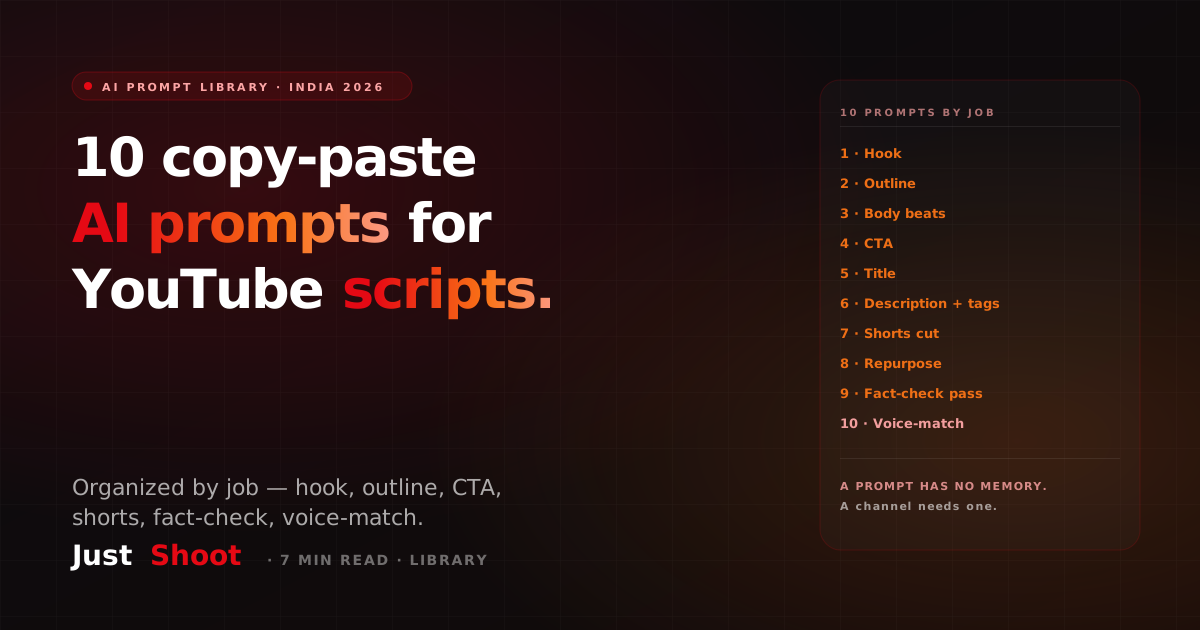
10 Copy-Paste AI Prompts for YouTube Scripts (India, 2026)
By Ashok Sachdev, Founder of JustShoot · Published 2026-06-29
Short answer: A good YouTube script prompt library is organized by job, not by topic — one prompt for the hook, one for the outline, one for the body beats, one for the CTA, one for the title, one for the description, one for shorts cuts, one for repurposing, one for a fact-check pass, and one for matching your voice. Copy the ten below, fill the brackets, and you have a working AI scriptwriting workflow today. They run in ChatGPT, Claude, or Gemini. The catch is memory: a prompt forgets your channel the moment the chat ends, so by video 20 you are re-describing your voice on every upload.
I build an AI scripting tool for Indian creators, so weigh my framing accordingly — but these prompts are genuinely useful and yours to keep, tool or no tool. Below is the library, then the honest line about where a prompt library stops scaling.
How to use this library
Each prompt has bracketed slots — [niche], [topic], [length], [audience]. Fill them in, paste, and iterate. Run them in sequence (hook → outline → body → CTA) and you have built a script in four passes. The one rule that beats every prompt trick: paste a paragraph of your own past transcript into the chat first and tell the model "match this voice." Without that, the model defaults to generic American YouTuber cadence, which is the robotic AI tell Indian audiences spot instantly.
The 10 prompts, by job
1 · The hook prompt
Act as a YouTube scriptwriter for an Indian [niche] channel. Write 3
hook options (5-15 seconds each) for a video titled "[title]". Each hook
must restate the title's promise in fresh words and open a curiosity gap.
Use a [Hinglish / Hindi / English] voice. No "Hi guys, welcome back."
Three variants force you to choose rather than accept the first guess. (More on engineering these in our first-30-seconds hook guide.)
2 · The outline prompt
Outline a [length]-minute YouTube script on [topic] for [audience].
Give 5-7 sections with a one-line purpose each, ordered for retention
(strongest payoff teased early, delivered across the middle, not dumped
at the end). Mark where a pattern-interrupt should go.
3 · The body-beat prompt
Expand section [N] of this outline into spoken-word script. Conversational,
short sentences, one idea per breath. Indian audience — use [Hinglish blend].
Avoid filler ("basically", "at the end of the day"). Target ~[wpm] words.
4 · The CTA prompt
Write 2 call-to-action variants for this video: one mid-roll soft ask tied
to the value just delivered, one end-screen ask. No "smash that like button."
Make the ask specific to [the video's payoff].
5 · The title prompt
Generate 8 YouTube titles for this script. Mix curiosity, specificity, and
a number. Keep under 60 characters. Indian audience — a Hinglish title is
allowed if it reads naturally. Flag the one most likely to be over-clickbait.
6 · The description + tags prompt
Write a YouTube description for this script: a keyword-rich first 150
characters, a 2-line summary, timestamps from the outline, and 12 tags
mixing broad + long-tail terms an Indian viewer would actually search.
7 · The shorts-cut prompt
From this long-form script, write 3 standalone YouTube Shorts scripts
(under 50 seconds each). Each needs its own 3-second hook and a complete
payoff — not a teaser clip. Keep my voice consistent across all three.
8 · The repurpose prompt
Turn this script into [a LinkedIn post / a newsletter section / an X thread].
Lead with the single strongest idea, restructure for that platform's
reading pattern, keep one clear CTA. Don't just paste the transcript.
9 · The fact-check pass prompt
Review this script for factual claims. List every statistic, date, name,
and "studies show" assertion as a checklist with a confidence flag. Mark
anything that needs a primary source before I publish. Do not invent sources.
This catches the hallucinated stat that quietly tanks credibility — the same job a dedicated fact-check pass does more reliably.
10 · The voice-match prompt
Here is a transcript of my past video: [paste 300+ words]. Rewrite the
draft script above so it matches MY voice — my sentence rhythm, my hook
style, my Hinglish-to-English ratio, my recurring phrases. Don't smooth
me into generic YouTuber English.
Where a prompt library stops scaling
Run all ten and you will ship a solid script. Ship fifty videos this way and you will feel the wall: every single video, you re-paste prompt 10 and re-describe your voice from scratch, because the chat has no memory of who you are. The blend ratio drifts. The identity markers your audience subscribed for — yaar, dekho, seedha point pe — get sanded into neutral English by video 20. A prompt is a one-shot instruction; a channel is a 200-video commitment to sounding like one recognizable person.
That gap is exactly why a persisted Tone Fingerprint beats a prompt library once you publish weekly — it holds your voice across every project so video #50 sounds like video #1, instead of you re-prompting the same description forever. The deeper version of this argument is in AI script prompts vs a script tool; this page is the library it references.
Where JustShoot fits
Inside JustShoot's 9-agent pipeline, these ten jobs run as one connected context instead of ten separate chat windows — the hook agent, the script agent, the SEO agent, and the shorts agent all share the same locked channel voice, so the title matches the hook matches the script. You stop copy-pasting between prompts and re-describing yourself each time.
JustShoot starts at Trial ₹0 (7 days, 2 scripts, no card), then Starter ₹499/mo (3 scripts), Creator ₹999/mo (7 scripts, most popular), Pro ₹1999/mo (15 scripts), and Studio is custom. Every plan runs the full pipeline — only the number of scripts changes.
Want to check whether your current scripts read human or robotic? Run one through the JustShoot Robot Score tool — about a minute, free.
FAQ
What is the best AI prompt for a YouTube script? There isn't one — there are ten, organized by job (hook, outline, body, CTA, title, description, shorts, repurpose, fact-check, voice-match). A single mega-prompt produces a generic script; chaining job-specific prompts gives you control over each part. Copy the library above and run them in sequence.
Do these prompts work in ChatGPT, Claude, and Gemini? Yes. All ten are model-agnostic plain-language instructions. Results vary slightly — Claude tends to hold a pasted voice sample longer, ChatGPT is quicker for structure — but the prompts themselves transfer across all three.
How do I make AI scripts sound like me and not generic? Paste 300+ words of your own past transcript into the chat and use prompt 10 (the voice-match prompt) before generating. Without a real voice sample, the model defaults to generic cadence. For consistency across many videos, a persisted tone model beats re-pasting a sample every time.
Why do my AI scripts get worse the more videos I make? Because a prompt has no memory. Each new chat re-guesses your voice, so your Hinglish ratio and signature phrases drift over time. The fix is persistence — a tool that stores your voice once and applies it to every script, rather than a fresh prompt each upload.
Are copy-paste prompts enough, or do I need a tool? For a handful of videos, the library above is plenty. The moment you publish weekly and need fifty videos to sound like one person — with Hinglish blend control, fact-checking, and SEO in the same context — a purpose-built script tool saves the re-prompting tax. Start free and decide for yourself.
Ashok Sachdev is the founder of JustShoot, an AI content OS that writes YouTube scripts in your own voice for Indian creators. Connect on LinkedIn.
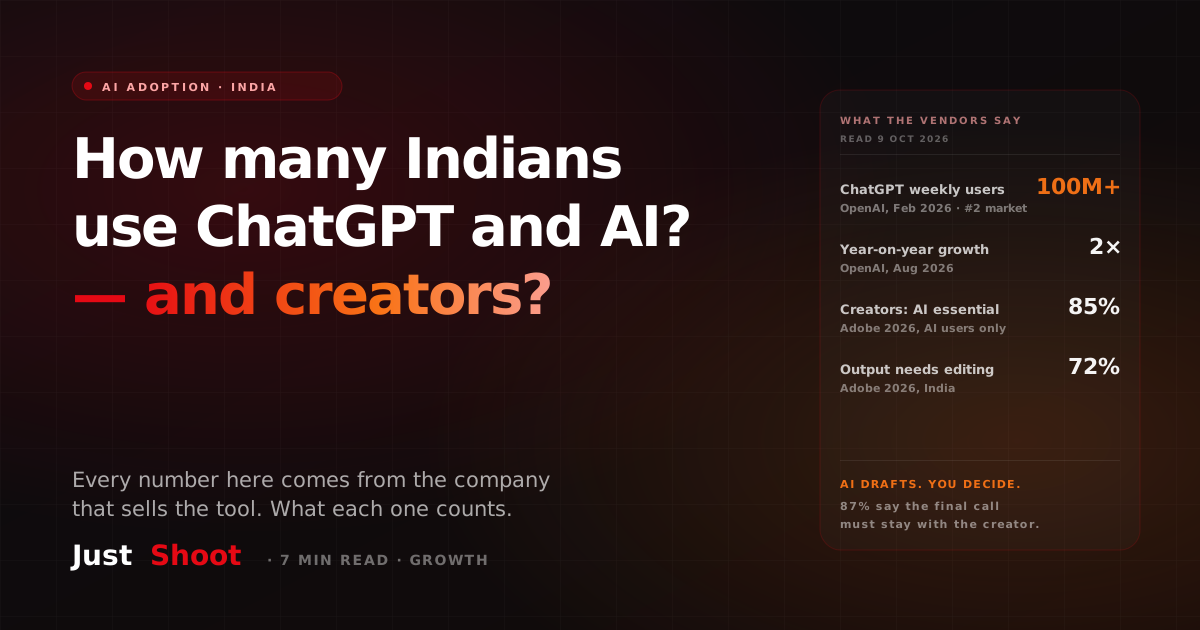
How Many Indians Use ChatGPT and AI Tools — and How Many Creators Do (2026)
OpenAI says India has 100 million weekly ChatGPT users. Adobe says almost every Indian creator it surveyed uses AI. What each number measures, and who measured it.
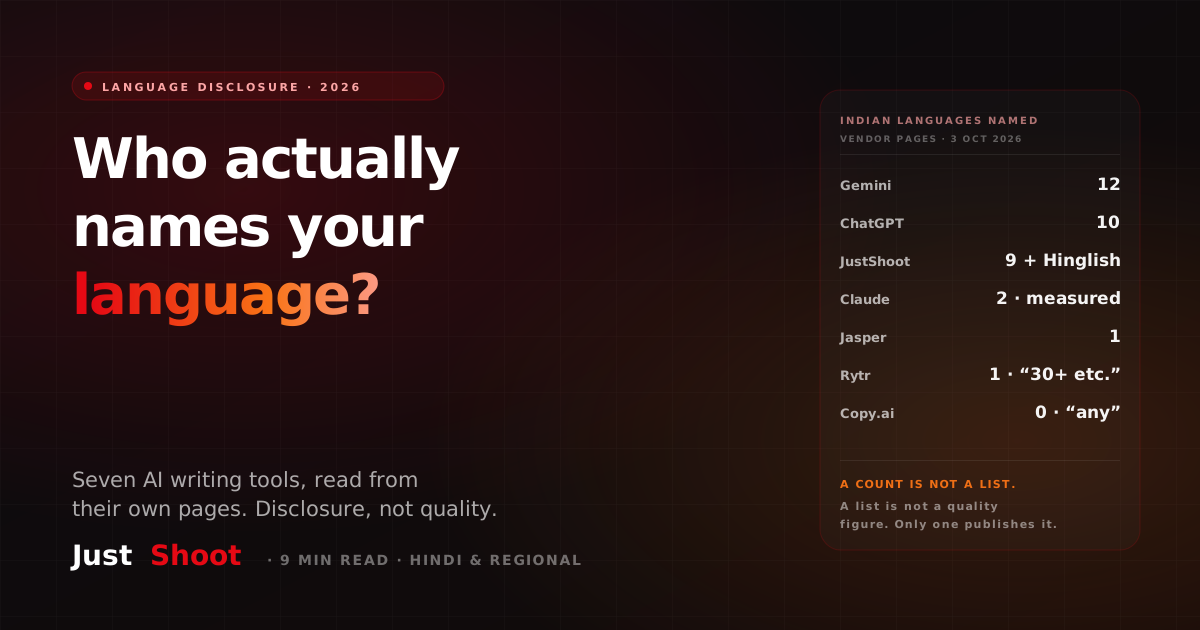
Which AI Writing Tools Actually Publish an Indian-Language List (2026)
Seven AI writing tools, checked on 3 October 2026: which name their Indian languages, which only give a count, and which say 'any language' and name none.
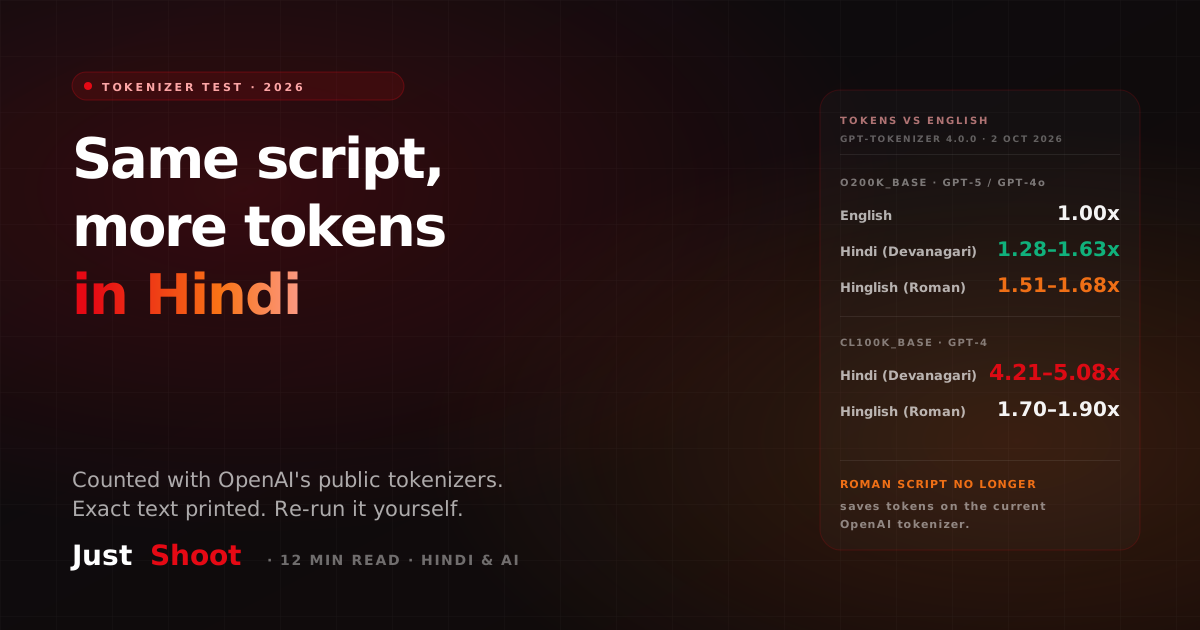
A Hindi Script Costs More Tokens Than the Same Script in English (2026)
One YouTube script in English, Devanagari Hindi and Hinglish, run through OpenAI's public tokenizers. On GPT-5's, Hindi costs 1.28–1.63x the English tokens.